

DSA - Digital Services Act
The Digital Services Act (DSA, EU 2022/2065) requires online platforms to allow reporting of illegal content. The plugin adds a report form, admin panel for managing reports, status tracking and automatic email notifications.
DSA requirements for online stores
Section titled “DSA requirements for online stores”From February 17, 2024, stores with user-generated content (reviews, comments, photos) must:
- Provide a mechanism for reporting illegal content
- Confirm receipt of the report
- Process the report within a reasonable timeframe
- Inform the reporter of the decision
- Allow an appeal against the decision
This applies to stores where users can publish content - primarily product reviews.
Report form
Section titled “Report form”Shortcode
Section titled “Shortcode”Embed the DSA report form on any page using the shortcode:
[polski_dsa_report]With parameters
Section titled “With parameters”[polski_dsa_report product_id="123" category="illegal_content"]Shortcode parameters
Section titled “Shortcode parameters”| Parameter | Description | Default value |
|---|---|---|
product_id | ID of the product the report concerns | None (user selects) |
category | Pre-selected report category | None |
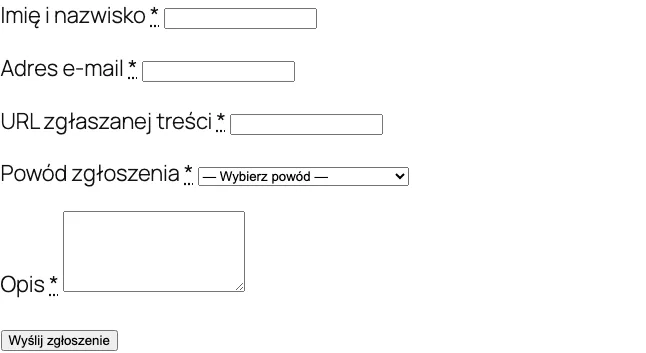
Form fields
Section titled “Form fields”The form contains the following fields:
- Report category - selection from a list (illegal content, copyright infringement, fake review, hate speech, personal data, other)
- URL or content identifier - link to the reported content or review ID
- Description - detailed description of the problem
- Legal basis - optional reference to legislation
- Contact details - name, email address of the reporter
- Declaration - checkbox confirming that the report is made in good faith
Embedding example
Section titled “Embedding example”Create a “Report Content” page and add the shortcode:
[polski_dsa_report]Add a link to this page in the store footer so it is easily accessible.
Admin panel
Section titled “Admin panel”Manage DSA reports in WooCommerce > DSA Reports.
Report list
Section titled “Report list”The list displays all reports with columns:
- Report ID
- Submission date
- Category
- Status (new, in progress, resolved, rejected)
- Reporter (name, email)
- Content link
Report details
Section titled “Report details”After clicking a report you see:
- Full form data
- Preview of the reported content (if it is a review - direct link)
- Status change history
- Internal note field
- Action buttons (change status, remove content, reject)
Report statuses
Section titled “Report statuses”| Status | Description |
|---|---|
new | New report, awaiting processing |
in_progress | Report under analysis |
resolved | Report processed, content removed or other action taken |
rejected | Report rejected as unfounded |
appealed | Reporter filed an appeal against the decision |
Email notifications
Section titled “Email notifications”The plugin sends automatic emails in these situations:
| Event | Recipient | Content |
|---|---|---|
| New report | Administrator | Information about the new report with data |
| Confirmation | Reporter | Confirmation of report receipt with ID number |
| Status change | Reporter | Information about status change with justification |
| Resolution | Reporter | Decision with justification and information about the right to appeal |
Email templates can be customized in WooCommerce > Settings > Emails.
polski/dsa/report_created
Section titled “polski/dsa/report_created”Triggered after creating a new DSA report.
/** * @param int    $report_id   DSA report ID. * @param array  $report_data Report data. * @param string $category    Report category. */add_action('polski/dsa/report_created', function (int $report_id, array $report_data, string $category): void {    // Example: send notification to the legal team via Slack    $webhook_url = 'https://hooks.slack.com/services/XXXX/YYYY/ZZZZ';
    wp_remote_post($webhook_url, [        'body' => wp_json_encode([            'text' => sprintf(                'New DSA report #%d (category: %s) - %s',                $report_id,                $category,                $report_data['description']            ),        ]),        'headers' => ['Content-Type' => 'application/json'],    ]);}, 10, 3);
Example - automatically hiding reviews of a specific category
Section titled “Example - automatically hiding reviews of a specific category”add_action('polski/dsa/report_created', function (int $report_id, array $report_data, string $category): void { // Automatically hold reviews reported as hate speech if ($category !== 'hate_speech') { return; }
$comment_id = $report_data['content_id'] ?? 0; if ($comment_id > 0) { wp_set_comment_status($comment_id, 'hold');
// Log the automatic action update_post_meta($report_id, '_auto_action', 'comment_held'); }}, 10, 3);Reporting
Section titled “Reporting”DSA requires maintaining a report register. Export all reports to CSV via WooCommerce > DSA Reports > Export. The export includes:
- Report ID
- Submission date and time
- Category
- Status and resolution date
- Processing time (in hours)
- Action taken
Configuration
Section titled “Configuration”DSA module settings are in WooCommerce > Settings > Polski > DSA.
| Option | Description | Default value |
|---|---|---|
| Enable DSA form | Activates the module | Yes |
| Form page | WordPress page with the shortcode | None |
| Administrator email | Email address for notifications | WordPress administrator email |
| Processing deadline | Number of business days for processing | 7 |
| Report categories | List of available categories | Default list |
Per-product widget (Polski 1.14.0+)
Section titled “Per-product widget (Polski 1.14.0+)”From 1.14.0 you can enable an optional report widget directly on the product page. The customer clicks “Zgłoś nielegalne treści (DSA)” and expands a form with the product URL and name prefilled - no manual link copy.
update_option('polski_dsa', array_merge( (array) get_option('polski_dsa', []), [ 'product_widget_enabled' => true, 'product_widget_position' => 'after_summary', // or 'product_meta' ]));The widget uses the HTML <details> element - works without JavaScript, accessible to keyboards and screen readers. The form posts to the same handler (polski_dsa_report), so submissions land in the same admin queue as shortcode submissions.
polski_dsa key | Value | Description |
|---|---|---|
product_widget_enabled | false (default) | Enables the widget on product pages |
product_widget_position | after_summary | product_meta | Position on the product page |
Developer filters:
| Filter | Purpose |
|---|---|
polski/dsa/product_widget_enabled | Master switch for the widget |
Troubleshooting
Section titled “Troubleshooting”The form does not display on the page
Check that the shortcode [polski_dsa_report] is on the page and the DSA module is enabled in settings.
Email notifications do not arrive
Check your SMTP configuration. The default wp_mail() function does not work on all servers. Install an SMTP plugin (e.g. WP Mail SMTP).
Reports do not appear in the panel
Check user permissions. Managing DSA reports requires the shop_manager or administrator role.
Next steps
Section titled “Next steps”- Report issues: GitHub Issues
- Discussions and questions: GitHub Discussions