

Omnibus Directive - price tracking
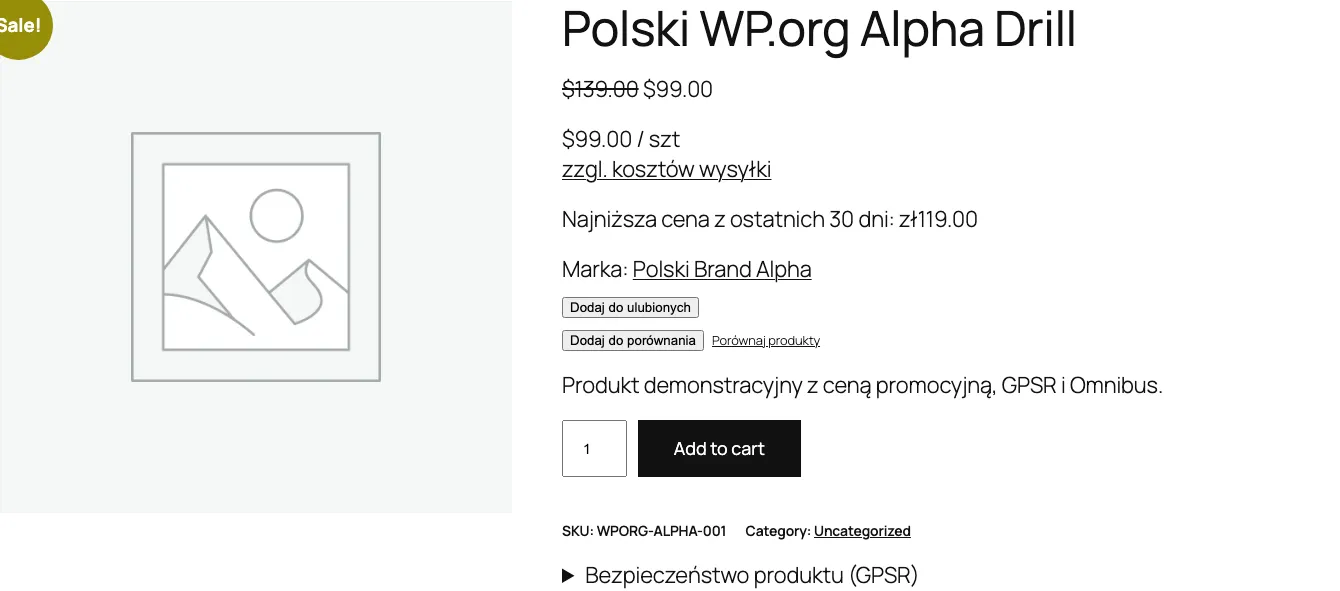
The Omnibus Directive (EU 2019/2161) has been in effect in Poland since January 1, 2023. With every price reduction you must show the lowest price from the last 30 days. The plugin automatically tracks price history and displays this information with promotions.
How price tracking works
Section titled “How price tracking works”The plugin records every product price change (including variations) in the database. When a product is “on sale”, the plugin calculates the lowest price from 30 days and shows it to customers.
Tracking starts after enabling the module. If a product has no price history yet, a placeholder message displays.
Configuration
Section titled “Configuration”Go to WooCommerce > Settings > Polski > Omnibus and configure the available options.
Tracking period
Section titled “Tracking period”| Option | Description | Default value |
|---|---|---|
days | Number of days back for calculating the lowest price | 30 |
prune_after_days | After how many days to delete old history entries | 90 |
prune_after_days controls the size of the database table. A value of 90 means data older than 90 days is automatically deleted.
| Option | Description | Default value |
|---|---|---|
include_tax | Whether the displayed Omnibus price should include VAT | true |
Set according to your WooCommerce price settings. If store prices are gross, leave true.
Display locations
Section titled “Display locations”| Option | Description | Default value |
|---|---|---|
display_on_sale_only | Display only for products on sale | true |
show_on_single | Single product page | true |
show_on_loop | Product list (category, shop) | false |
show_on_related | Related products | false |
show_on_cart | Cart | false |
Enable at least on the product page (show_on_single). On the product list (show_on_loop) it takes more space, but some interpretations of the regulations require it.
Regular price
Section titled “Regular price”| Option | Description | Default value |
|---|---|---|
show_regular_price | Also display the regular price alongside the Omnibus price | false |
Text template
Section titled “Text template”| Option | Description | Default value |
|---|---|---|
display_text | Template for the displayed message | Lowest price from {days} days before the discount: {price} |
no_history_text | Text when there is no price history | No previous price data available |
Available variables in the display_text template:
{price}- lowest price from the given period{days}- number of days (default 30){date}- date of the lowest price{regular_price}- regular product price (before promotion)
Template examples
Section titled “Template examples”Lowest price from {days} days before the discount: {price}Lowest price from the last {days} days: {price} (regular price: {regular_price})Omnibus: {price} (from {date})Price calculation method
Section titled “Price calculation method”| Option | Description | Default value |
|---|---|---|
price_count_from | When to start counting 30 days | sale_start |
Available values:
sale_start- from the sale start date (recommended by UOKiK)current_date- from the current date
Variable products
Section titled “Variable products”| Option | Description | Default value |
|---|---|---|
variable_tracking | Variant tracking method | per_variation |
Available values:
per_variation- separate tracking for each variant (recommended)parent_only- tracking only the parent product price
per_variation gives more accurate data, because each variant can have a different price and discount history.
Shortcode
Section titled “Shortcode”Use the shortcode [polski_omnibus_price] to display the lowest price information anywhere on the site.
Basic usage
Section titled “Basic usage”[polski_omnibus_price]Displays the Omnibus price for the current product.
With parameters
Section titled “With parameters”[polski_omnibus_price product_id="456" days="30"]Shortcode parameters
Section titled “Shortcode parameters”| Parameter | Description | Default value |
|---|---|---|
product_id | Product ID | Current product |
days | Number of days | Value from settings |
Example usage in a PHP template
Section titled “Example usage in a PHP template”echo do_shortcode('[polski_omnibus_price product_id="' . $product_id . '"]');Automatic history cleanup
Section titled “Automatic history cleanup”WP-Cron removes price history entries older than prune_after_days daily. The database table does not grow without limits.
To manually force cleanup, you can use WP-CLI:
wp cron event run polski_omnibus_pruneCompliance with UOKiK guidelines
Section titled “Compliance with UOKiK guidelines”UOKiK guidelines:
- The lowest price information must be displayed with every discount announcement
- The reference period is 30 days before applying the discount
- For products sold for less than 30 days - provide the lowest price since the date of introduction to sale
- For perishable products - the period may be shortened
The plugin follows these guidelines by default. The price_count_from option set to sale_start counts from the sale start date, as recommended by UOKiK.
Troubleshooting
Section titled “Troubleshooting”Omnibus price does not display
Check that the product has a sale price set in WooCommerce. With display_on_sale_only enabled, the message appears only during an active promotion.
A no-history message displays Price tracking starts after enabling the module. Wait for a price change or save the product again to add the first history entry.
Omnibus price is the same as the sale price This is correct behavior if the product has not had a lower price in the last 30 days.
Next steps
Section titled “Next steps”- Report issues: GitHub Issues
- Discussions and questions: GitHub Discussions