

GPSR - product safety
The GPSR (General Product Safety Regulation, EU 2023/988) has been in effect since December 13, 2024. It requires providing product safety information for products sold in the EU. Polski for WooCommerce adds product fields, a status column and CSV import/export - everything you need, without additional plugins.
GPSR requirements
Section titled “GPSR requirements”Every non-food product sold in the EU must include:
- Manufacturer data - name, address, contact details
- Importer data - if the manufacturer is based outside the EU
- EU responsible person - required for products from outside the EU
- Product identifiers - batch number, serial number, EAN/GTIN code
- Warnings - information about hazards and age restrictions
- Safety instructions - safe use guidelines
- Photos/documents - optional attachments (safety data sheets, certificates)
- Risk category - product risk level classification
Configuring GPSR fields
Section titled “Configuring GPSR fields”GPSR fields are in the product editor, in the Polski - GPSR tab. Each field is optional, but fill in all that apply to the given product.
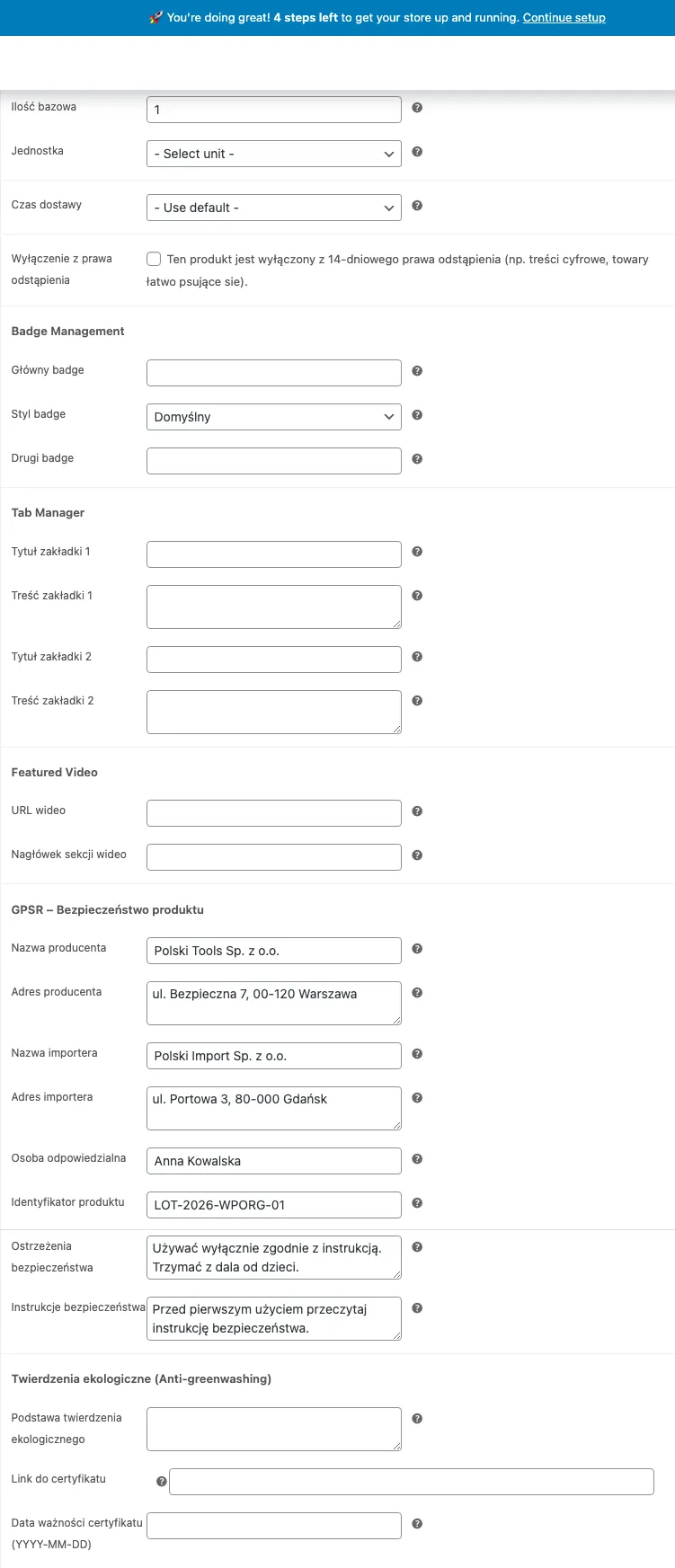
Manufacturer
Section titled “Manufacturer”Fill in the full manufacturer data:
- Company name
- Address (street, postal code, city, country)
- Email address
- Phone number
- Website
Importer
Section titled “Importer”Required when the manufacturer is based outside the EU. Provide the same data as for the manufacturer.
EU responsible person
Section titled “EU responsible person”Every non-food product from an entity outside the EU must have a responsible person based in the Union. Provide:
- Company name or full name
- Address in the EU
- Contact details (email, phone)
Product identifiers
Section titled “Product identifiers”- Batch number (LOT) - production batch identifier
- Serial number - unique item identifier
- EAN/GTIN - product barcode
- Model number - model designation
Warnings and restrictions
Section titled “Warnings and restrictions”Text field for information about:
- Hazards related to use
- Age restrictions (e.g. “Not suitable for children under 3 years”)
- Adult supervision requirements
- Hazardous substances
Safety instructions
Section titled “Safety instructions”Field for instructions about:
- Proper assembly and installation
- Safe use
- Maintenance and storage
- Procedure in case of accident
GPSR status column
Section titled “GPSR status column”On the product list (Products > All Products) the plugin adds a GPSR column with completion status:
- Green icon - all required fields filled
- Orange icon - partially filled
- Red icon - no GPSR data
The column lets you quickly find products that need data completion.
CSV import and export
Section titled “CSV import and export”Export
Section titled “Export”When exporting products (Products > Export) the plugin adds GPSR columns to the CSV file:
gpsr_manufacturer_namegpsr_manufacturer_addressgpsr_manufacturer_emailgpsr_manufacturer_phonegpsr_manufacturer_urlgpsr_importer_namegpsr_importer_addressgpsr_importer_emailgpsr_eu_responsible_namegpsr_eu_responsible_addressgpsr_eu_responsible_emailgpsr_identifiers_lotgpsr_identifiers_serialgpsr_identifiers_eangpsr_identifiers_modelgpsr_warningsgpsr_instructions
Import
Section titled “Import”Prepare a CSV file with the same headers as the export format. Import via Products > Import.
Tip: export a few products first - you will get a CSV template with correct headers.
Shortcode
Section titled “Shortcode”Use the shortcode [polski_gpsr] to display GPSR information on the product page or anywhere on the site.
Basic usage
Section titled “Basic usage”[polski_gpsr]Displays GPSR data for the current product (works on WooCommerce product pages).
With a specific product
Section titled “With a specific product”[polski_gpsr product_id="123"]Displays GPSR data for the product with the given ID.
Example output
Section titled “Example output”The shortcode generates a formatted table with sections:
| Section | Content |
|---|---|
| Manufacturer | Name, address, email, phone, website |
| Importer | Name, address, email (if applicable) |
| EU responsible person | Name, address, contact details |
| Identifiers | LOT, serial number, EAN, model |
| Warnings | Warning text |
| Instructions | Safety instructions text |
Bulk data completion
Section titled “Bulk data completion”If many products have the same manufacturer, the fastest method is:
- Export products to CSV
- Fill in manufacturer columns for all rows (copy-paste in a spreadsheet)
- Import the updated CSV file
Troubleshooting
Section titled “Troubleshooting”GPSR fields do not appear in the product editor Make sure the GPSR module is enabled in plugin settings: WooCommerce > Settings > Polski > Modules.
The status column does not display on the product list Click the “Screen Options” button in the top right corner of the product list page and check the GPSR column.
Data does not import from CSV Check that the column headers in the CSV file exactly match the export format. Column names are case-sensitive.
Next steps
Section titled “Next steps”- Report issues: GitHub Issues
- Discussions and questions: GitHub Discussions