

Right of withdrawal from the contract
EU Directive 2023/2673 introduces new obligations regarding the right of withdrawal (from June 19, 2026). The plugin handles the entire process - customer form, email confirmations, product exclusions and developer hooks.
Legal requirements
Section titled “Legal requirements”A consumer can withdraw from a distance contract within 14 days without giving a reason. As a seller you must:
- Inform the consumer about the right of withdrawal before concluding the contract
- Provide a withdrawal form
- Confirm receipt of the withdrawal statement
- Refund the payment within 14 days of receiving the statement
Directive 2023/2673 adds the requirement of a digital process for submitting statements and automatic confirmations.
Customer process
Section titled “Customer process”Step 1 - button in My Account
Section titled “Step 1 - button in My Account”After enabling the module, a “Withdraw from contract” button appears in My Account > Orders next to orders eligible for return. The button is visible for 14 days from delivery.
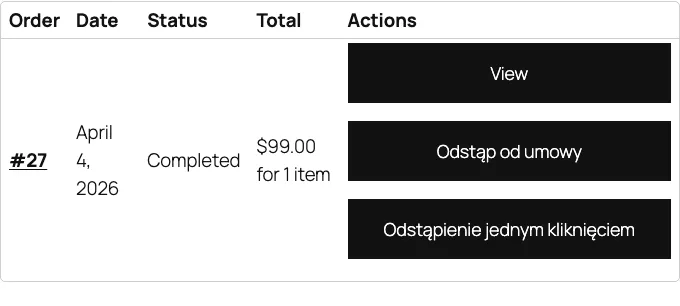
Step 2 - withdrawal form
Section titled “Step 2 - withdrawal form”After clicking the button, the customer sees a form with fields:
- Order number (automatically filled)
- Order date
- List of products from the order (with the ability to select which ones to withdraw from)
- Withdrawal reason (optional)
- Customer contact details
- Bank account number for refund
Step 3 - email confirmation
Section titled “Step 3 - email confirmation”After submitting the form, the system automatically:
- Sends the customer an email confirming receipt of the withdrawal statement
- Sends the store administrator a notification about the new submission
- Changes the submission status to “Pending”
Then process the submission in the WooCommerce panel and mark it as completed.
Product exclusions
Section titled “Product exclusions”Some products are not subject to the right of withdrawal. Mark them as excluded in the Polski - Withdrawal tab in the product editor.
Typical exclusions according to Article 38 of the Consumer Rights Act:
- Custom-made or personalized products
- Perishable products
- Sealed products for hygiene reasons (after opening)
- Audio/visual recordings in sealed packaging (after opening)
- Digital content delivered online (after service commencement)
- Press (newspapers, periodicals, magazines)
For excluded products, the “Withdraw from contract” button does not appear in the customer panel.
Shortcode
Section titled “Shortcode”Use the shortcode [polski_withdrawal_form] to display the withdrawal form anywhere on the site.
Basic usage
Section titled “Basic usage”[polski_withdrawal_form]Displays the form for the logged-in customer. The customer must select an order from the list.
With a specific order
Section titled “With a specific order”[polski_withdrawal_form order_id="789"]Displays the form filled with data from the given order ID. The plugin checks that the logged-in user is the order owner.
Embedding example on a page
Section titled “Embedding example on a page”Create a dedicated “Contract Withdrawal Form” page and place the shortcode:
[polski_withdrawal_form]In settings (WooCommerce > Settings > Polski > Withdrawal) point to this page as the default form page.
polski/withdrawal/requested
Section titled “polski/withdrawal/requested”Triggered when a customer submits the withdrawal form.
/** * @param int $withdrawal_id Withdrawal submission ID. * @param int $order_id WooCommerce order ID. * @param array $form_data Form data. */add_action('polski/withdrawal/requested', function (int $withdrawal_id, int $order_id, array $form_data): void { // Example: send notification to external CRM system $crm_api = new MyCrmApi(); $crm_api->notify_withdrawal($order_id, $form_data['reason']);}, 10, 3);polski/withdrawal/confirmed
Section titled “polski/withdrawal/confirmed”Triggered when the administrator confirms receipt of the submission.
/** * @param int $withdrawal_id Withdrawal submission ID. * @param int $order_id WooCommerce order ID. */add_action('polski/withdrawal/confirmed', function (int $withdrawal_id, int $order_id): void { // Example: change order status $order = wc_get_order($order_id); if ($order) { $order->update_status('withdrawal-confirmed', 'Withdrawal confirmed.'); }}, 10, 2);polski/withdrawal/completed
Section titled “polski/withdrawal/completed”Triggered when the entire withdrawal process is completed (refund processed).
/** * @param int $withdrawal_id Withdrawal submission ID. * @param int $order_id WooCommerce order ID. * @param float $refund_amount Refund amount. */add_action('polski/withdrawal/completed', function (int $withdrawal_id, int $order_id, float $refund_amount): void { // Example: register refund in accounting system do_action('my_accounting/register_refund', $order_id, $refund_amount);}, 10, 3);polski/withdrawal/eligible
Section titled “polski/withdrawal/eligible”Filter allowing you to programmatically determine whether an order qualifies for withdrawal.
/** * @param bool $is_eligible Whether the order qualifies for withdrawal. * @param WC_Order $order WooCommerce order object. * @return bool */add_filter('polski/withdrawal/eligible', function (bool $is_eligible, WC_Order $order): bool { // Example: exclude orders from the "services" category foreach ($order->get_items() as $item) { $product = $item->get_product(); if ($product && has_term('uslugi', 'product_cat', $product->get_id())) { return false; } } return $is_eligible;}, 10, 2);polski/withdrawal/period_days
Section titled “polski/withdrawal/period_days”Filter allowing you to change the withdrawal period (default 14 days).
/** * @param int $days Number of days for withdrawal. * @param WC_Order $order WooCommerce order object. * @return int */add_filter('polski/withdrawal/period_days', function (int $days, WC_Order $order): int { // Example: extend period to 30 days during the holiday season $order_date = $order->get_date_created(); if ($order_date) { $month = (int) $order_date->format('m'); if ($month === 12) { return 30; } } return $days;}, 10, 2);polski/withdrawal/form_fields
Section titled “polski/withdrawal/form_fields”Filter allowing you to modify the withdrawal form fields.
/** * @param array $fields Array of form fields. * @return array */add_filter('polski/withdrawal/form_fields', function (array $fields): array { // Example: add a preferred refund method field $fields['refund_method'] = [ 'type' => 'select', 'label' => 'Preferred refund method', 'required' => true, 'options' => [ 'bank_transfer' => 'Bank transfer', 'original' => 'Same payment method', ], ]; return $fields;}, 10, 1);Submission administration
Section titled “Submission administration”Find submissions in WooCommerce > Withdrawals. Each submission contains:
- Order number and link to the order
- Form submission date
- Status (pending, confirmed, completed, rejected)
- Customer data
- List of products covered by the withdrawal
- Reason (if provided)
You can change the status, add a note or process the refund directly from the panel.
Troubleshooting
Section titled “Troubleshooting”The “Withdraw from contract” button does not display Check that: (1) the module is enabled, (2) the order has “Completed” status, (3) the withdrawal period has not expired, (4) no product in the order is excluded.
Customer does not receive a confirmation email Check the WooCommerce email configuration in WooCommerce > Settings > Emails and make sure the “Withdrawal confirmation” template is enabled.
Next steps
Section titled “Next steps”- Report issues: GitHub Issues
- Discussions and questions: GitHub Discussions